

In Unix-like systems everything is a file. Or at least, most of the system is exposed as one.
Devices, running processes, network state, kernel state: much of it appears through filesystem-like interfaces that you can read and write using the same small set of commands. For example /proc/cpuinfo isn’t a file sitting on disk anywhere, but you can cat it just like any other file.
That uniformity made the system composable. It enabled combinations of simple utils that nobody specifically needed to design for. It also means you can discover things without knowing exactly where they are in advance.
The opposite approach to this was how Microsoft built Windows. In Windows everything, without going too much into the details, is sort of an object, with its own set of APIs. As an example, most of the configuration lives in the Registry, a structured database accessed through a set of functions.
This is a perfectly reasonable design for a desktop OS built primarily for people using graphical interfaces. To inspect or change information, you generally need to know which interface or operation was designed for it. Neither design is wrong, it’s the result of different philosophies and targeted users that developed over the years.
What do Agents like more?
Agents are, per their nature, much closer to a terminal wiz than they are to a person with a mouse. They can drive a graphical UI with a combination of taking screenshots, deciding between targets and catching errors from whatever pops up on the screen. This is slow and inefficient enough though that even browser agents avoid working through the browser GUI when they can inspect the structured state or interact with the DOM directly.
Aside from model intelligence, the environment determines what an agent can actually do. Limited tools mean limited actions, even with the best model available. With the right environments we can already see how capable the models are.
The way many agent platforms are being built today is by gradually exposing product features as tools, usually as a MCP.
Even well-designed tools with progressive disclosure suffer from a version of the same problem Windows would have for agents: the model needs to understand not only the business requirements, but also which tools exist, how to discover them, the limitations of each tool and which specific tools it needs to combine for a particular job. Tools are custom built, take JSON in, spit JSON out. If an edgecase falls outside of what the tools were designed for, the Agent will start to go on a journey trying to stitch together tool calls, or is simply unable to fulfil the request. There’s points for the other side but generally we see many problems in using MCP for complex, multistep work.
So we took the “Everything is a file” philosophy and applied it to our entire platform.
We engineered the platform to be accessible entirely through a terminal by representing product state and actions through a filesystem interface. As far as our agents are concerned our entire platform is files.
So who gets the terminal?
Does that mean our customers review invoices with a CLI? Obviously not. Our customers are Finance professionals who love their mouse, GUI and keyboard shortcuts. Their home turf is Microsoft Office. How to resolve this conflict of interest? Build for humans, and agents get tools duct-taped on. Build for agents, and users get forced into the shell. We didn’t feel like picking.
We have two interfaces over the same underlying state: a web application for users, and a filesystem for agents.
Take our reconciliation table. In the web app it’s a table with rows, review panel, approvers, commenters, data and reference traces.
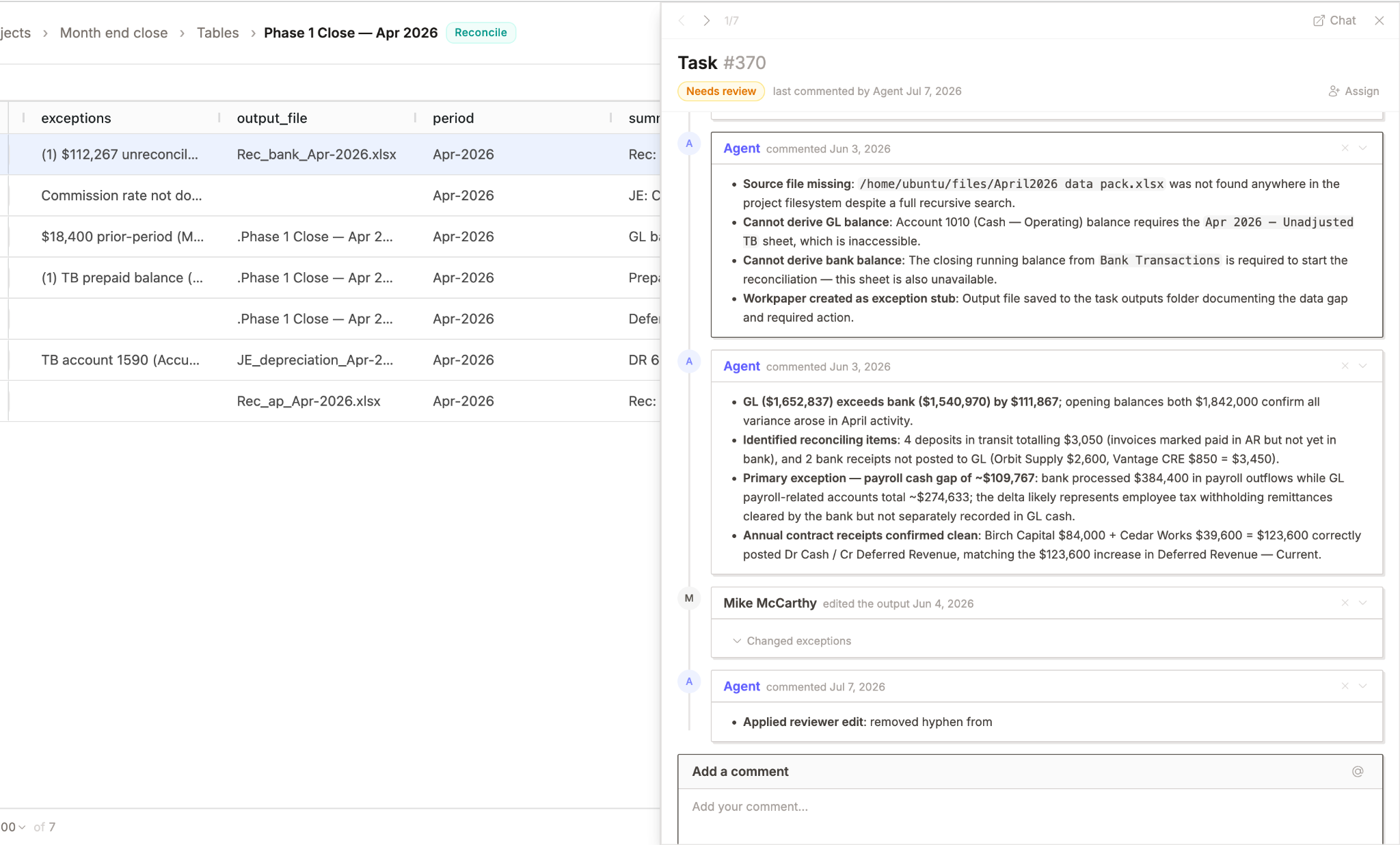
In the agent world, every row is a directory, with all information structured in the tree:
/reconcile/invoice-818/

    summary.md

    input/

        subject_header.eml

        invoice.pdf

    comments/

        2026-03-04-johnsmith/

            comment.md

            attachment.pdf

        2026-03-06-approver.md

/reconcile/invoice-881/

    summary.md

    input/

        another_subject_header.eml

        invoice.pdf

    comments/

        2026-03-04-johndoe.md

        2026-03-06-approver.md

    references/

        vendor-statement.csv
When a user asks e.g. ‘Why was this flagged as a duplicate?’, we don’t need an extra endpoint for that question. There is no explain_duplicate_flag tool.
The agent can just self explore the evidence through the filesystem, check the neighboring records and find an explanation with the present evidence and platform created data. There’s an infinite amount of possible questions, most of them not anticipated. Having an environment that allows us to leverage the intelligence and terminal capabilities of the agent means that we don’t have to check for missing tools and connector gaps between our system and the agent. As long as we make sure that the data is structured semantically sound, everything to solve a task is there.
We need to be clear about what the filesystem is: it’s a projection of our platform state, not a copy of it. Both interfaces read and write the same state. That way our agents can perform actions on the platform, generate new files and data and generally act like a whole user.
The obvious objection
A couple of things about this probably sound wrong.
A filesystem doesn’t give an application-level schema or type system by default. And in a multi-tenant system, giving an agent a shell sounds like a data leak waiting to happen.
It may sound like we’re suggesting taking a product state, dumping it into files in a VM somewhere, and rebuilding a web app on top of that.
With two sources of truth there’s going to be synchronization problems forever.
These problems only arise if the filesystem is a storage layer. But it’s not, it’s an interface.
We use FUSE: Filesystem in Userspace (our implementation is called FakeFUSE; more about this in a future blog). FUSE registers a mount point with the kernel and routes every VFS operation against it (open, read, readdir, write, stat,etc.) out of the kernel and into callbacks in a userspace process. When something touches the mount, the kernel doesn’t consult a block device; it dispatches the syscall to our daemon, which computes the response at request time and hands the bytes back. To the caller it’s indistinguishable from a real file. (This is the same thing that procfs does: /proc/cpuinfo has no backing store, the kernel synthesizes it per read. FUSE just lets you implement that pattern in userspace, against your own domain.)
So when the agent runs:
cat /reconcile/invoice-818/summary.md
there isn’t a real summary.md on disk. The request lands in our read handler which then calls the same underlying application service that powers the web app, then renders the result as Markdown instead of DOM.
The card in the browser isn’t sitting on the disk either. Both interfaces are projections of the same underlying state, generated at request time. They differ only in how that state is presented.
Writes work the same way in reverse:
echo approved > status
lands in a write handler, which calls the same service method as the Approve button in the web app.
If the row isn’t in a state where approval is legal, the write fails. The filesystem doesn’t bypass the application’s rules any more than the web UI does. An agent can attempt an invalid transition but can’t perform one.
Is this the final answer for agent interfaces? Probably not. FUSE has real costs, and rendering application state as files requires opinionated choices, especially for data that doesn’t map cleanly onto a filesystem. Controlling access of different agents to different parts of the filesystem became a major part of our filesystem orchestration. But six months in, our agents answer questions and take actions we never designed for, using little more than coreutils, and we haven’t written a tool since.